Page 1 of 2
VPS
Posted: Thu Sep 16, 2010 4:58 pm
by skalleno
Hi i have just installed PM on my VPS server, i cannot get it to work, have tried to log on with 127.0.0.1:8087, no go, but the strange thing is when i set internet ip adress to auto lookup, i get "invalid code page" and the server does not show up in active servers list, it says error updating pokermavens.net database. Any suggestions?
Re: VPS
Posted: Thu Sep 16, 2010 5:12 pm
by Kent Briggs
skalleno wrote:Hi i have just installed PM on my VPS server, i cannot get it to work, have tried to log on with 127.0.0.1:8087, no go, but the strange thing is when i set internet ip adress to auto lookup, i get "invalid code page" and the server does not show up in active servers list, it says error updating pokermavens.net database. Any suggestions?
A few questions:
So 127.0.0.1 shows up as the Local IP Address setting on Poker Mavens' System tab? And 8087 is the File Port setting. And you pressed the Start button on the toolbar and it went gray, correct? And you ran the IE browser that was on the VPS (not the browser on your PC), right?
Re: VPS
Posted: Thu Sep 16, 2010 11:06 pm
by skalleno
Yes that is correct.
Re: VPS
Posted: Fri Sep 17, 2010 9:39 am
by Kent Briggs
skalleno wrote:Yes that is correct.
Could just be a firewall issue. Try adding PMServer.exe to the Windows firewall exception list and the file and packet ports. Also please email me a screen shot of that invalid code page error. I've never seen that before.
Re: VPS
Posted: Fri Sep 17, 2010 1:15 pm
by skalleno
There is no firewall running inside the server. But here is the image.
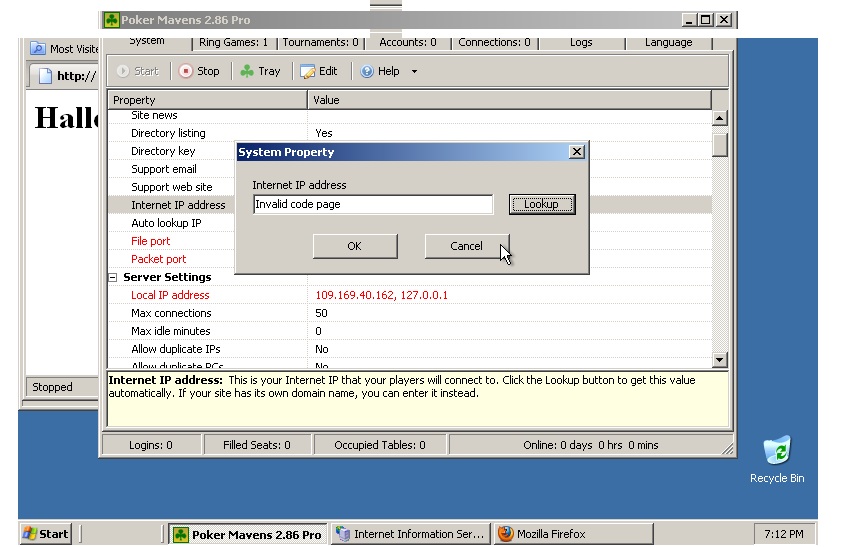
- error.jpg (134.5 KiB) Viewed 14334 times
Re: VPS
Posted: Fri Sep 17, 2010 1:53 pm
by Kent Briggs
Apparently the HTTP component I'm using is expecting a default code page installed on your Windows system and is not finding one. Which is odd because the poker server is all based on unicode strings anyway. Code pages are the old way of using the high ascii values for non-English languages in Windows.
The IP Lookup button is just calling this function on my web site to get your IP value:
http://www.pokermavens.net/poker.php?Command=GetIP
If you ran IE on your VPS and entered that URL it should display something like this:
IP=109.169.40.162
which should match the local IP value I see in your screen shot. Try that manually and see if it does. Anyway, with the code page issue, go into your Windows Control Panel and reset your locale and language settings and see if that fixes the problem. I found some instructions here:
XP and older:
http://www.sisulizer.com/localization/s ... s-xp.shtml
Vista and newer:
http://www.sisulizer.com/localization/s ... s-w7.shtml
Re: VPS
Posted: Fri Sep 17, 2010 2:34 pm
by skalleno
Tried your suggestion, but no luck. I am wondering if it has something to do with the VPS i am using, maybe there is a setting in windows server 2003, that i am not aware of.
Re: VPS
Posted: Fri Sep 17, 2010 3:05 pm
by Kent Briggs
skalleno wrote:Tried your suggestion, but no luck. I am wondering if it has something to do with the VPS i am using, maybe there is a setting in windows server 2003, that i am not aware of.
Did the manual method work from IE?
Re: VPS
Posted: Sat Sep 18, 2010 7:47 am
by skalleno
Nevermind figured it out

Re: VPS
Posted: Sat Sep 18, 2010 9:13 am
by Kent Briggs
skalleno wrote:Nevermind figured it out
So what was it, in case this happens to someone else?