How To : Discord Poker Bot
Posted: Mon Mar 02, 2020 3:22 am
Disclaimer: I'm not a developer and I'm new to PHP so my code is what they call naive, but it works. You would likely pay $50-$150 for some developer to do this for you (I did once before, then he ran off with everything), so it might be worth it to give it a shot yourself.
Below is code to create a Discord Poker Bot (Webhook) for your poker site that can do many things using the callback system. In my last "How To" I posted I showed a crude example of how to create KO Tournaments with Player Bounties, so my first example below will be for a Discord Bot that post each KO into a channel on Discord which includes who was KO'd, who won the Bounty, the Tournament Name and the Bounty amount won.
KO Tourney Bounty Bot
Please note, this code is assuming you've already used the KO Tourney code in my previous post and the variables needed are already assigned. This is not my original code, I simply modified code I found on the internet to suit my purposes, credit goes to the original author.
The above code is simply pasted directly below the KO Tourney code in the previous How To. Then head over to your Discord server, create a channel or use an existing channel where you want the bot to post and click on the settings for that channel, then click Webhooks.
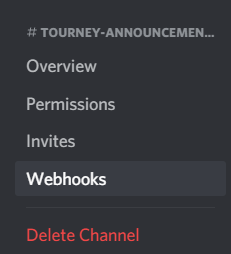
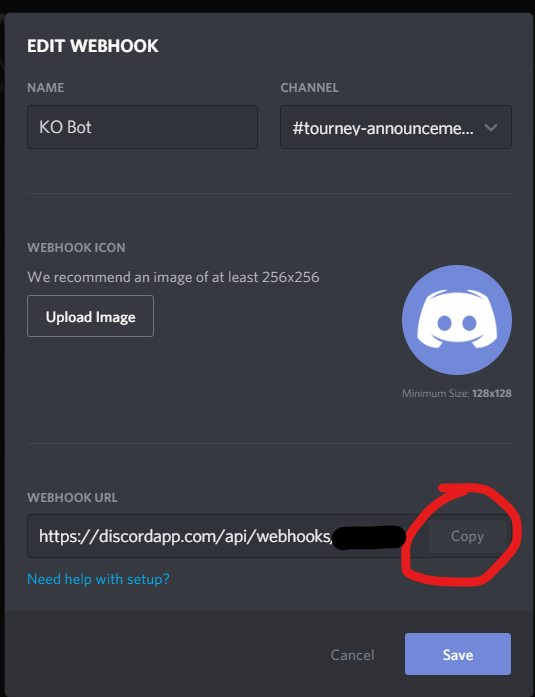
Once you're in the Webhooks panel, click the big blue Create Webhook button. After that enter the name for your bot, upload an image if you want and then copy the Webhook URL at the bottom and paste into the code above where you see ...
$result = file_get_contents('https://discordapp.com/api/webhooks/YOUR WEBHOOK', false, $context);
Tourney Registration Open Bot
This code also will go into the callback.php file under this section ...
case "TourneyTimer":
fwrite($f,"Event = " . $event . "\n");
fwrite($f,"Name = " . $_POST["Name"] . "\n");
fwrite($f,"Number = " . $_POST["Number"] . "\n");
fwrite($f,"Timer = " . $_POST["Timer"] . "\n");
fwrite($f,"Count = " . $_POST["Count"] . "\n");
fwrite($f,"Time = " . $_POST["Time"] . "\n");
fwrite($f,"\n");
break;
Simplified Tourney Registration Open Bot
Note : In the $message = ""; you can also insert any Discord Role on your server you would like to ping with this message. This can be useful if you have a group that want to be notified via Discord when a tourney is opening. Simply add <@&ROLEID>, using the actual Role ID for your role by right clicking on it in Discord and selecting Copy ID from the menu.
Using this code and a little modification you should be able to copypasta it anywhere in your callback.php file sections to do many things with it and either really annoy everyone in your Discord server or provide some useful information!
Hopefully I haven't missed anything and I hope you find this useful! If you are a Developer and you see that I've done something completely wrong or in a naive way that could be better, feel free to correct me ... I need to learn!
Below is code to create a Discord Poker Bot (Webhook) for your poker site that can do many things using the callback system. In my last "How To" I posted I showed a crude example of how to create KO Tournaments with Player Bounties, so my first example below will be for a Discord Bot that post each KO into a channel on Discord which includes who was KO'd, who won the Bounty, the Tournament Name and the Bounty amount won.
KO Tourney Bounty Bot
Please note, this code is assuming you've already used the KO Tourney code in my previous post and the variables needed are already assigned. This is not my original code, I simply modified code I found on the internet to suit my purposes, credit goes to the original author.
Code: Select all
       // send bot message to Discord
	        $message = "**$BountyPlayer Knocked Out $kodplayer from $TourneyName and won $bountyamt Chips!**";
		$data = ['content' => $message];
			$options = [
						'http' => [
						'method' => 'POST',
						'header' => 'Content-Type: application/json',
						'content' => json_encode($data)
		           			]
					];

			$context = stream_context_create($options);
$result = file_get_contents('https://discordapp.com/api/webhooks/YOUR WEBHOOK', false, $context);Once you're in the Webhooks panel, click the big blue Create Webhook button. After that enter the name for your bot, upload an image if you want and then copy the Webhook URL at the bottom and paste into the code above where you see ...
$result = file_get_contents('https://discordapp.com/api/webhooks/YOUR WEBHOOK', false, $context);
Tourney Registration Open Bot
This code also will go into the callback.php file under this section ...
case "TourneyTimer":
fwrite($f,"Event = " . $event . "\n");
fwrite($f,"Name = " . $_POST["Name"] . "\n");
fwrite($f,"Number = " . $_POST["Number"] . "\n");
fwrite($f,"Timer = " . $_POST["Timer"] . "\n");
fwrite($f,"Count = " . $_POST["Count"] . "\n");
fwrite($f,"Time = " . $_POST["Time"] . "\n");
fwrite($f,"\n");
Code: Select all
          $TourneyName = $_POST["Name"];

          // This part is only shown as an example and only necessary if you want to limit which tourneys post via the bot
          $params = array("Command" => "TournamentsGet", "Name" => $TourneyName);
          $api = Poker_API($params);
          $result = $api -> Result;
          // limit by prizebonus
          $prizepool = $api -> PrizeBonus;
          // limit by currency
          $currency = $api -> PrimaryCurrency;

          if (($TourneyStart == "RegOpens") && ($currency == "Yes" || ($currency == "No" && $prizepool > 499))) {

          // send bot message
          $message = "**$TourneyName Tourney Registration is Open!**";
          $data = ['content' => $message];
             $options = [
				'http' => [
				'method' => 'POST',
				'header' => 'Content-Type: application/json',
				'content' => json_encode($data)
				]
			];
          $context = stream_context_create($options);
          $result = file_get_contents('https://discordapp.com/api/webhooks/YOUR WEBHOOK', false, $context);

          // ADDED BONUS : send message to poker lobby
          $params = array("Command" => "SystemLobbyMessage", "Message" => "$TourneyName Tournament registration is open!");
          $api = Poker_API($params);
          $result = $api -> Result;
          }
Simplified Tourney Registration Open Bot
Code: Select all
          $TourneyName = $_POST["Name"];
          // send bot message
          $message = "**$TourneyName Tourney Registration is Open!**";
          $data = ['content' => $message];
             $options = [
				'http' => [
				'method' => 'POST',
				'header' => 'Content-Type: application/json',
				'content' => json_encode($data)
				]
			];
          $context = stream_context_create($options);
$result = file_get_contents('https://discordapp.com/api/webhooks/YOUR WEBHOOK', false, $context);Using this code and a little modification you should be able to copypasta it anywhere in your callback.php file sections to do many things with it and either really annoy everyone in your Discord server or provide some useful information!
Hopefully I haven't missed anything and I hope you find this useful! If you are a Developer and you see that I've done something completely wrong or in a naive way that could be better, feel free to correct me ... I need to learn!